
Caregiver Messaging Opt-In/Out
Opt-In/Out to receive Messages from your Staffing Firm
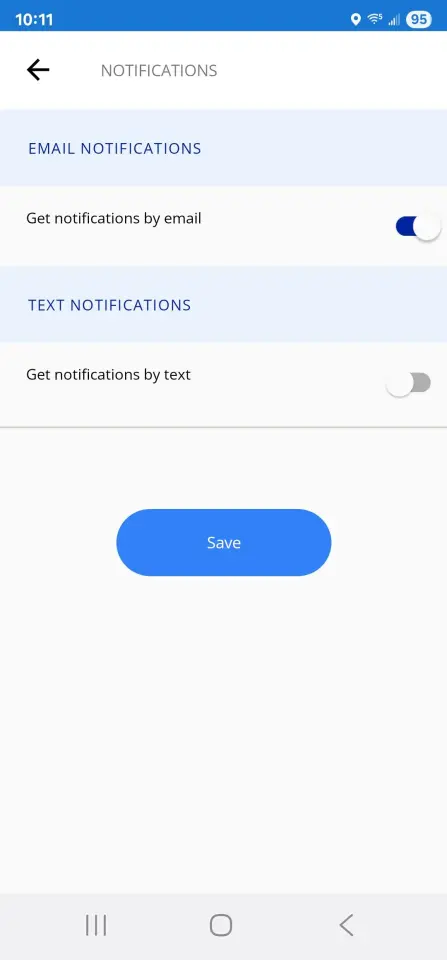
As a True Helix user linked to one of our customers’ scheduling systems, you can choose to get email or text alerts whenever your staffing firm needs to send important updates about your scheduled shifts.
- Guide you through hiring tasks
- Notify you of shift confirmations, changes, or cancellations
- Update you on on-site work directions
- Alert you to certification renewals needed for compliance
- Notify you of new shift opportunities
How to Opt-In:
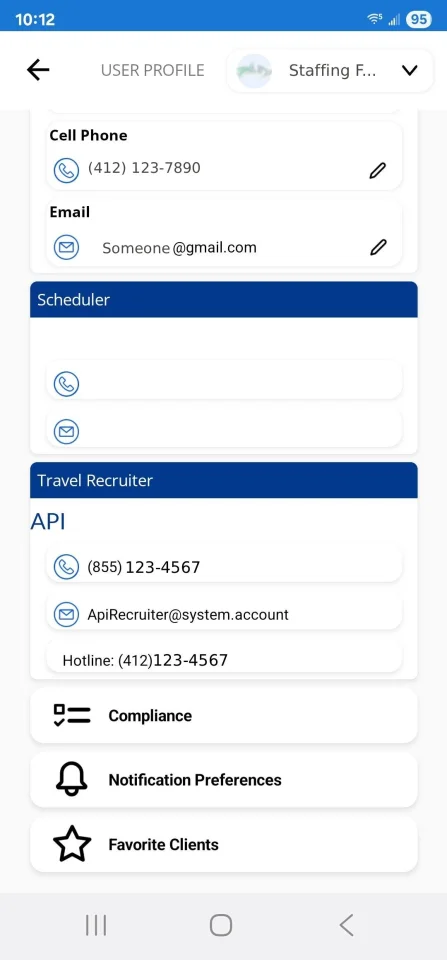
- Tap your profile picture in the top-right corner to open the User Profile screen.
- Use the dropdown in the top-right corner to choose the staffing firm you’d like to participate in messaging with.
- Scroll down to Notification Preferences.
- Choose whether you want notifications via Text and/or Email, then tap Save.
Notes:
- Notification settings are specific to the staffing firm shown at the top of your profile. You’ll need to set preferences separately for each firm.
- Notifications will be sent to the email address and/or cell phone number listed in your profile. You can update these on the same page.
- For text messages, you can reply STOP at any time to opt-out, and UNSTOP to opt back in.
Users without the mobile app, please use this form